The Reimbursement Flow in MyFam360 — Source-Linked Settlements and Income Auto-Match
MyFam360's recurring reimbursement flow links settlements to their source expense or income, so 'who paid me back for what' is no longer a guessing game.
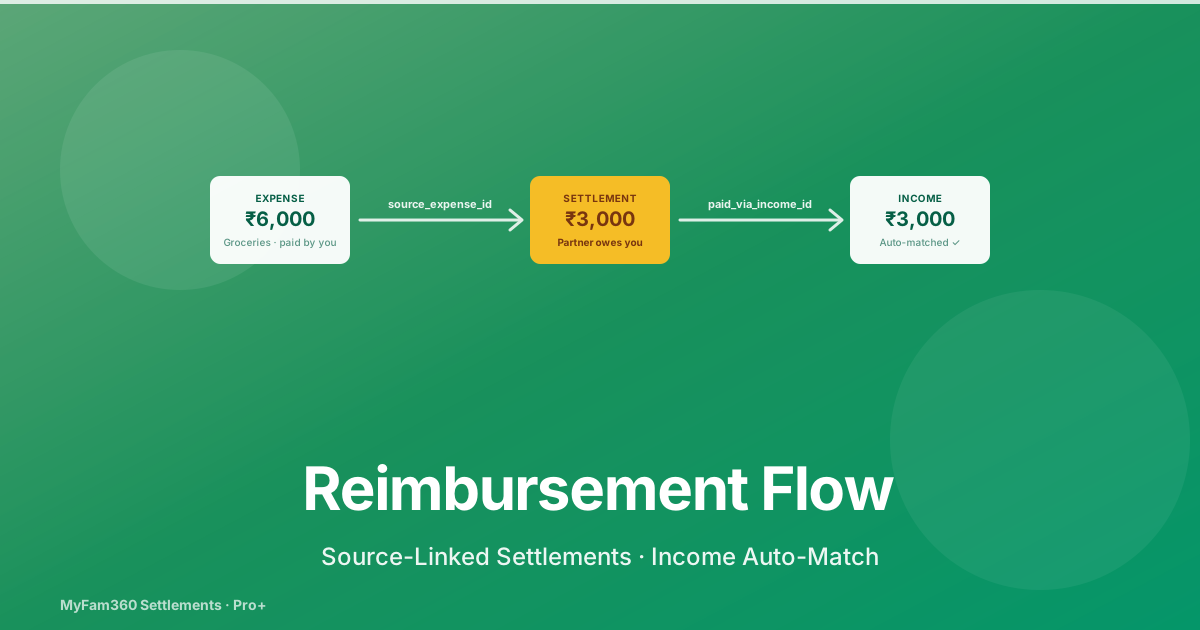
The cleanest description of why personal finance gets messy: money moves in one direction physically, in a different direction mentally, and a third direction on paper. You buy ₹6,000 of groceries for the household; your spouse Venmos ₹3,000 to your account two weeks later; you eventually log the income and forget that it was supposed to be a reimbursement, so the income inflates your “what I earned this month” number and the original expense stays attributed only to you.
The Reimbursement Flow shipped in MyFam360 (v2.1 → v2.2) makes these three views agree. Every settlement now carries a trace back to its source expense or recurring template, and forward to the income that paid it off. This post walks through the model, the UI, and the Pro+ features that make it usable at scale.
The Source Link Model
Settlements in MyFam360 represent debts between members — somebody owes somebody else for a shared expense. Before the recent work, a settlement was a self-contained row: amount, payer, payee, status.
Three new nullable foreign-key columns now connect a settlement to its context:
| Column | When it’s set |
|---|---|
source_expense_id | When the settlement was created from a one-off shared expense |
source_recurring_id | When the settlement was created from a recurring template’s generated expense |
paid_via_income_id | When an income transaction closes the chain (links the inbound money to the outbound debt) |
The columns are indexed (partial indexes on Postgres via postgresql_where) for fast lookups. None of them are required — old settlements can live without them, and new settlements only set the relevant ones.
How Settlements Get Source-Linked
Two places in the code stamp source links automatically:
expense_service.create_expense()
When a member creates a shared expense, the resulting settlement chains get source_expense_id pointing at the new expense’s ID.
recurring_service._generate_expense_from_template()
When the recurring scheduler generates an expense from a template (say, the 1st-of-the-month rent share), the resulting settlement chains get both source_expense_id (the generated expense) and source_recurring_id (the template).
That second link is the important one. It means you can ask: “across all the rent-share settlements I’ve created over the last 12 months, what’s the total my partner has reimbursed me?” The query joins on source_recurring_id and aggregates.
The third column, paid_via_income_id, gets set later — when an income closes the chain.
The Backfill Script
A one-shot script scripts/backfill_settlement_source_links.py runs against existing settlements and infers source links by matching:
- Settlement amount against nearby expenses (within ±7 days)
- Settlement amount against nearby income (within ±14 days, only for chains marked settled)
- Settlement creation timestamps against recurring template generation dates
The script is dry-run-by-default. The first pass logs proposed links without writing. Once the team verifies the matches look right, the script is rerun with --apply.
For ambiguous cases (multiple candidate matches), the script leaves the source FKs null and the settlement surfaces in the Reimbursements page without source context. You can still mark such chains paid; you just don’t get the source breadcrumb.
The Reimbursements Page
A dedicated route at /reimbursements in the sidebar. The page has three sections:
Summary Cards
Two cards at the top:
- Owed to you — total amount across all open chains where you’re the payee
- You owe — total amount across all open chains where you’re the payer
Each card shows the net total and the count of chains contributing to it.
Filters
A row of pill filters above the chain list:
- All
- Owed to you
- You owe
- Settled (last 30 days)
Plus a date-range picker and a search field that matches against chain descriptions.
Chain List
Each chain row shows:
- The source — “From your share of groceries” (from
source_expense_id) or “Recurring rent share — Apr 2026” (fromsource_recurring_id) - The counterparty member
- The amount
- The age of the chain (days since creation)
- A status pill (open / partially settled / settled)
- Action buttons appropriate to the chain type and your plan
The action set depends on whether you’re the payer or payee and what plan you’re on.
Batch Mark-Paid
The most common Reimbursements action: somebody Venmos you ₹6,400 to cover three separate chains (groceries, fuel, last week’s movie). Instead of marking each chain individually, select them with checkboxes and tap Mark Paid.
The modal asks for the income source (if you’re going to log a corresponding income) and a confirmation. On confirm, the frontend flattens the selection into individual settlement IDs and posts them to the backend, which processes them atomically — either all succeed or none do.
If you also log a corresponding income in the same flow, paid_via_income_id gets set on each closed settlement, completing the trace.
Income Auto-Match (Pro+)
This is the most useful Pro/Family+ feature in the recent work.
When you log an income on a paid plan, MyFam360 checks:
- Does the amount exactly match the sum of one or more open chains where you’re the payee?
- Is the income source member (or the inferred payer) the counterparty on those chains?
- Is the income date within a reasonable window of the chain creation?
If a single exact match exists, the income form surfaces a banner:
“This looks like a reimbursement for these chains — match them?”
with a one-tap Match button. Tapping it closes the matched chains and stamps paid_via_income_id.
The matching logic was hardened in v2.2.0 to require exact amount parity (not “within ±10”). Approximate matches surface the chains as candidates but require explicit user confirmation. This prevents the system from accidentally closing the wrong chain when amounts are close but not equal.
Reimbursement Reminders (Pro+)
If you’re owed money and the chain has been open for a while, you can send a reminder to the payer. The reminder rules:
- One reminder per chain per UTC day — anti-spam
- A weekly digest as fallback — if you haven’t sent any reminders, the system can send a single consolidated digest on Sundays summarising all your open chains
- Per-user opt-out in Settings → Reimbursement Reminders
Free plan members see the chain balances and can mark-paid, but the Send Reminder action is gated to Pro/Family+. Pro adds individual reminders; Family+ adds the weekly digest.
The grouped chains response also includes settlement_ids[] so the frontend can target the underlying settlement rows for batch mark-paid in one click after a reminder lands.
The Settings Tab
A new card in Settings → Reimbursements:
| Setting | Default | Meaning |
|---|---|---|
| Reimbursement reminders | On | Allow reminders to be sent to you |
| Weekly digest | On (Family+) | Send the Sunday consolidated digest |
| Auto-match prompts | On (Pro+) | Show the income auto-match banner |
Opt-outs are honoured by the reminder and reminder-digest services before sending. You won’t get unwanted reminders even if your counterparty taps Send Reminder.
What This Means For You
The Reimbursement Flow is most valuable in shared-expense households — couples splitting rent and groceries, roommates sharing utilities, family members reimbursing one another for school fees.
If that’s you, three habits to develop:
-
When you log a shared expense, leave the default split. Don’t pre-emptively mark the other person as having paid you back unless they actually have — the chain is what tracks the debt.
-
When you receive a reimbursement income, accept the auto-match banner if it appears. This is the moment the three views (expense → settlement → income) get linked into one traceable story.
-
On Pro+, check the Reimbursements page weekly. Anything older than 30 days that’s still open is worth a reminder. Most “I forgot to pay you back” situations resolve themselves in one tap.
Across a year of household money management, source-linked settlements turn a folder of WhatsApp screenshots and bank SMS into a structured ledger. The structure is what makes the next conversation about money easier than the last one.
See Also
- How to Track and Settle Shared Expenses Between Family Members — the settlement basics
- How to Set Up Recurring Expenses in MyFam360 — the recurring template that stamps
source_recurring_id - Trip Splits and Guest Participants in MyFam360 — adjacent shared-expense surface
- What’s New in MyFam360 — the Roundup
Take control of your family finances — free
MyFam360 lets your whole family track expenses, set budgets, and hit savings goals together. Free to start, no credit card needed.
Free plan available · No credit card required · Cancel anytime
Frequently Asked Questions
What is a 'settlement source link'?
Each settlement row in MyFam360 now carries three nullable FK columns: source_expense_id (set when the settlement came from a one-off shared expense), source_recurring_id (set when the expense was generated from a recurring template), and paid_via_income_id (set when an income transaction closes the chain). Together they let you trace any settlement back to the underlying transaction it represents — and forward to the income that paid it off.
Will my old settlements get source-linked too?
Yes, where possible. A one-shot backfill script (scripts/backfill_settlement_source_links.py) runs in dry-run-first mode against existing settlements and infers source links by matching settlement amounts and dates against nearby expenses, recurring templates, and incomes. Settlements that can't be reliably linked are left with null source FKs and surface normally in the Reimbursements page.
What does income auto-match do?
When you log an income on a Pro or Family+ plan, MyFam360 checks the amount, the member, and the time window against your outstanding 'owed to you' reimbursement chains. If there's a single, exact match on amount and member, a banner appears in the income form: 'This looks like a reimbursement for these chains — match them?' Confirming closes the chains and sets paid_via_income_id on each settlement.
Why does auto-match require an exact amount match?
Because partial matches lead to incorrect chain closure. If you log a ₹3,000 income against two ₹1,500 chains, it's not always obvious whether you got reimbursed for both or just one. The exact-match requirement (enforced in v2.2.0) prevents the system from making a guess and ensures any closed chain is actually closed. Mismatches surface the chains as candidates but require explicit user confirmation.
How do batch mark-paid actions work?
On the Reimbursements page, select one or more chains via checkbox, tap Mark Paid, confirm in the modal. The frontend flattens the selection into individual settlement IDs and the backend processes them atomically — either all succeed or none do. This is useful when somebody pays you back for multiple chains in a single bank transfer.
Can I send reminders to people who owe me money?
On Pro and Family+ plans, yes. The Reimbursements page has a Send Reminder action on each owed-to-you chain. Rules: one reminder per chain per day (anti-spam), a weekly digest as a fallback if you've been silent, and a global opt-out in Settings → Reimbursement Reminders. Free plan members can see balances but can't send reminders.
Does the recurring expense generator also stamp source links?
Yes. When recurring_service._generate_expense_from_template creates a new expense from a recurring template, the resulting expense's split rows (and any auto-created settlement chains) carry source_recurring_id = the template's ID. This is what makes Reimbursements smart enough to group all recurring-derived chains under their parent template.
Share this article
Related Articles
How to Track Your Credit Cards in MyFam360 — The Foundation
Add credit cards to MyFam360 with joint cardholders, billing-cycle days, and an automatic account mirror that powers every downstream feature.
21 May 2026
App GuideAskAI History in MyFam360 — Pin, Re-Run, and Why the Cap Doesn't Reset
AskAI in MyFam360 now persists every question, lets you pin favourites, and supports one-click re-runs against current data. Here's how the history flow works.
21 May 2026
App GuideCredit Card Annual Fees and the 'Worth Keeping' Verdict in MyFam360
How MyFam360 charges and tracks annual fees automatically, and the Family+ 'Worth Keeping' verdict that tells you whether the card is paying for itself.
21 May 2026