Recording a Credit Card Payment in MyFam360 — With the Impact Preview
How MyFam360's Record Payment modal models the finance charge and revolving balance before you confirm, so 'pay minimum' never sneaks up on you again.
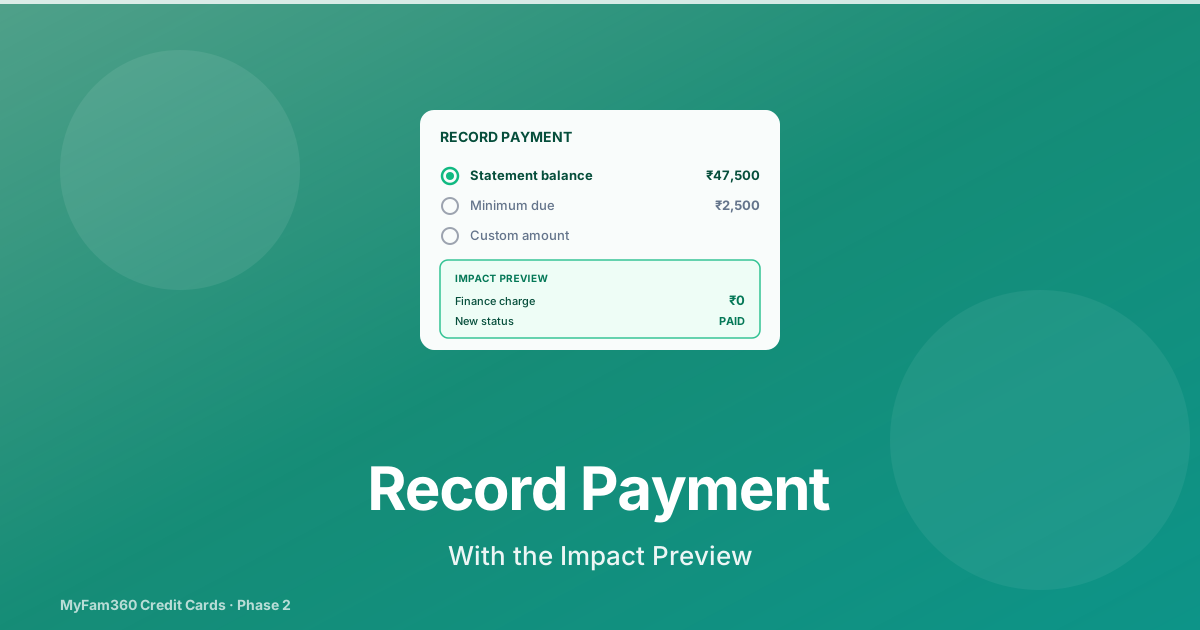
The single most expensive choice anyone makes with a credit card is the choice between paying the minimum and paying the full balance. Most issuers print both numbers on the statement but make the minimum visually larger — it’s the number designed to be tapped.
MyFam360’s Record Payment modal is built around making that choice deliberate. Before you confirm, the modal shows you the cost of choosing the minimum. After you confirm, every downstream record — statement status, card balance, notifications — updates atomically.
This post walks through what the modal does, what gets written, and why the preview matters.
If you haven’t yet seen how statements get created, the statements post is the prerequisite.
Where the Modal Lives
There are three entry points into the Record Payment modal:
- Per-card icon on the Credit Cards page — the IndianRupee icon button on each card row picks the most recent open / min_paid / overdue statement and pre-loads it.
- Dashboard widget CTA — when the Credit Cards aggregate strip surfaces a “Record Payment” CTA, it pre-loads with the statement returned by
aggregate.next_due. - Calendar
credit_due_dateevent — tapping a due-date event in the Calendar opens the modal with both the card and the statement fetched in parallel.
All three converge on the same modal — RecordPaymentModal in the frontend, backed by record_payment() in credit_payment_service.py.
The Three Amount Options
The modal opens with three radio buttons:
Minimum Due
The amount the issuer requires you to pay to keep the account current. Typically 5% of the statement balance plus any past-due amount, capped at the full balance.
Statement Balance
The full amount owed for the cycle. Paying this clears the statement and avoids any finance charge.
Custom
A free-text amount. The impact preview reacts as you type.
You can switch between the three at any point. The preview updates accordingly.
The Impact Preview
Below the amount selector, three values update on a 300ms debounce:
Revolving Balance After
Computed as statement_balance - payment_amount. If the payment fully covers the balance, this is zero. If it’s a minimum payment on a ₹50,000 statement (payment_amount = ₹2,500), this is ₹47,500.
Projected Finance Charge
This is the one that matters. Computed using the card’s APR (default 36% annualised) applied to the revolving balance over the next cycle. If you revolve ₹47,500 forward, the projected finance charge for the next cycle is roughly ₹1,425 — that’s pure interest the bank earns from you.
The number is shown in rupees, not as a rate. ₹1,425 is harder to dismiss than “36% APR”.
Projected Statement Status
One of three values:
paid— payment fully covers the balancemin_paid— payment meets the minimum but not the full balanceopen— payment is below the minimum
The status updates in real time as you type. Watching it tick from min_paid to paid as you increase the payment amount is, by design, a tiny moment of friction that makes the right choice feel rewarding.
The preview function is preview_payment_impact() — pure read, no DB writes. You can model “what if I only pay ₹5,000?” without affecting any records.
What Happens When You Confirm
The confirm button triggers record_payment(), which runs as a single transaction:
- Insert a CreditPayment row with
amount,payment_date,payment_method(UPI, net banking, auto-debit, etc.), andreference(the bank’s transaction ID, if you’ve copied it in). - Bump
statement.paid_amountby the payment amount. - Recompute statement status via
compute_statement_status(stmt):paid_amount >= total_due→paidpaid_amount >= minimum_due→min_paid- else →
open
- Set
paid_aton the statement if the new status ispaid. - Decrement
card.current_outstandingby the payment amount, capped at zero. - Fire
credit_payment_recordednotification to the primary cardholder and any joint cardholders. - Write an
audit_logsrow withaction='payment_recorded'.
The transactional cascade is important: if any step fails (e.g., the audit log insert), the whole payment is rolled back. You don’t end up with a statement marked paid but a card whose outstanding wasn’t decremented.
What Doesn’t Happen
A few things deliberately don’t happen during a payment:
- No bank transfer. MyFam360 is a tracker, not a payment gateway. The actual money movement is through your bank.
- No reward reversal. Rewards earned on the cycle’s expenses are not reversed when you pay — they were earned by the spend, not by the carrying.
- No annual fee insertion. Annual fees have their own scheduler (see the annual fees post) and never flow through the payment path.
The Project-Specific Bit: Why Payments Don’t Touch Annual Fees
There’s a subtle design choice documented in CLAUDE.md that deserves an explanation: when the annual-fee scheduler charges a fee, it does not insert a credit_payments row.
Why? Because credit_payment.credit_statement_id is NOT NULL. Every payment must belong to a statement. But an annual fee charge isn’t tied to a single statement — it’s a card-level event. And record_payment decrements outstanding, which is the wrong semantic direction for a fee charge (a charge increases outstanding, doesn’t decrease it).
So the annual-fee scheduler writes an audit_logs row with action='annual_fee_charged' (or annual_fee_waived) instead. The audit log captures the event without contaminating the payment ledger.
This is the kind of thing you don’t have to know to use MyFam360 — but if you ever look at the data model in support, knowing that payments and fee charges are two separate ledgers prevents a lot of confusion.
A Worked Example
Statement balance: ₹50,000. Minimum due: ₹2,500.
| Choice | Payment | Revolving balance | Projected charge | Status |
|---|---|---|---|---|
| Minimum | ₹2,500 | ₹47,500 | ~₹1,425 | min_paid |
| Half | ₹25,000 | ₹25,000 | ~₹750 | min_paid |
| Statement balance | ₹50,000 | ₹0 | ₹0 | paid |
Most months, paying the full balance is “free” in finance-charge terms but feels expensive in cash-out. The trade-off is real. The point of the modal is to make the cost legible.
What This Means For You
Two habits to develop:
- Always look at the projected finance charge before confirming a minimum-only payment. If the number is uncomfortable, find the rest of the cash.
- Record the payment in MyFam360 immediately after paying through your bank. Same-day recording keeps your statement status accurate and triggers the
credit_payment_recordednotification — which is especially useful in shared-card households where the other cardholder needs to see the payment reflected.
See Also
Take control of your family finances — free
MyFam360 lets your whole family track expenses, set budgets, and hit savings goals together. Free to start, no credit card needed.
Free plan available · No credit card required · Cancel anytime
Frequently Asked Questions
What does the impact preview actually show me?
Three things, updated as you type the payment amount: the revolving balance after the payment (what stays on the card), the projected finance charge if the statement only meets the minimum due (in rupees, not just a rate), and the projected statement status (paid, min_paid, or open). All three are computed by a read-only preview function in the backend — nothing is saved until you confirm.
Why does MyFam360 ask which statement I'm paying?
Because a credit card can have multiple open statements at once if you've been carrying a balance for several cycles. Each statement has its own paid amount, status, and due date. By targeting a specific statement, MyFam360 can correctly recompute that statement's status, mark it paid when the balance is fully cleared, and avoid double-counting payments across cycles.
Can I record a payment that covers more than the statement balance?
Yes. If you overpay (statement balance ₹15,000, payment ₹20,000), the excess decrements the card's current_outstanding beyond zero — capped at zero. MyFam360 marks the statement as paid and the remaining ₹5,000 sits as a credit on the card. Most issuers handle this the same way; MyFam360 mirrors that behaviour.
Does recording a payment in MyFam360 actually pay my bill at the bank?
No. MyFam360 is a tracking app. Recording a payment updates your statement and card records inside MyFam360 so your reports and notifications reflect reality, but the actual bank-to-bank transfer still happens through your bank's net banking, UPI, or auto-debit. The recommended workflow is to make the payment with your bank first, then come back to MyFam360 and record it.
What audit trail does a recorded payment leave?
Every payment writes a CreditPayment row (with amount, payment_date, payment_method, and a reference field for the transaction ID), bumps the statement's paid_amount, recomputes the statement status using compute_statement_status(), decrements the card's current_outstanding (capped at zero), and writes an audit_log row with action='payment_recorded'. The CreditPayment rows are visible on the statement detail page, and the audit log is queryable from the Activity feed.
What is the credit_payment_recorded notification?
When a payment is recorded, MyFam360 fires a notification of type credit_payment_recorded synchronously (not on the next scheduler tick) to the primary cardholder and all joint cardholders. The notification body includes the payment amount, the card nickname, and the new statement status. This is useful in shared-card situations where one spouse pays the bill and the other should immediately see it in the app.
Share this article
Related Articles
How to Track Your Credit Cards in MyFam360 — The Foundation
Add credit cards to MyFam360 with joint cardholders, billing-cycle days, and an automatic account mirror that powers every downstream feature.
21 May 2026
App GuideAskAI History in MyFam360 — Pin, Re-Run, and Why the Cap Doesn't Reset
AskAI in MyFam360 now persists every question, lets you pin favourites, and supports one-click re-runs against current data. Here's how the history flow works.
21 May 2026
App GuideCredit Card Annual Fees and the 'Worth Keeping' Verdict in MyFam360
How MyFam360 charges and tracks annual fees automatically, and the Family+ 'Worth Keeping' verdict that tells you whether the card is paying for itself.
21 May 2026